Have a proper lookbefore you sign up.
Whelpy is where a UK dog breeder keeps the lot: the mating, the whelping night, every puppy’s weight, what the buyers have paid, and the paperwork the council and HMRC ask for. Every picture below is the real app on a real screen — nothing on this page is drawn or mocked up.
Whelpy Lite is free forever — not a trial, and no card. Whelpy Pro adds the council record book, the accounts and the Kennel Club tools; each step below says which of the two it belongs to.
About these screenshots
They are captures of a demo kennel we set up for the purpose — Oakvale Gundogs, with invented dogs, litters and buyers. No real breeder’s, buyer’s or puppy’s information appears anywhere on this page, and nothing here came out of a paying kennel’s records.
The demo kennel is on Whelpy Pro, which is why the Pro screens and menu items are visible in the shots. Every step is labelled with the plan it belongs to, and you can compare the two plans side by side.
One honest caveat: the puppy photographs in the buyer’s view are stand-in images, not real photographs of puppies. Whelpy stores your own photos — we just have not put a real breeder’s litter on a public page. Every other thing you can see — each weight, date, chart, total and schedule — is what the app drew from the demo records.
A breeding year, in the order it happens
Mating, pregnancy, the whelping night, puppies growing, buyers, and then the paperwork. That is how the app is laid out, so that is how this runs.
Your kennel, first thing in the morning
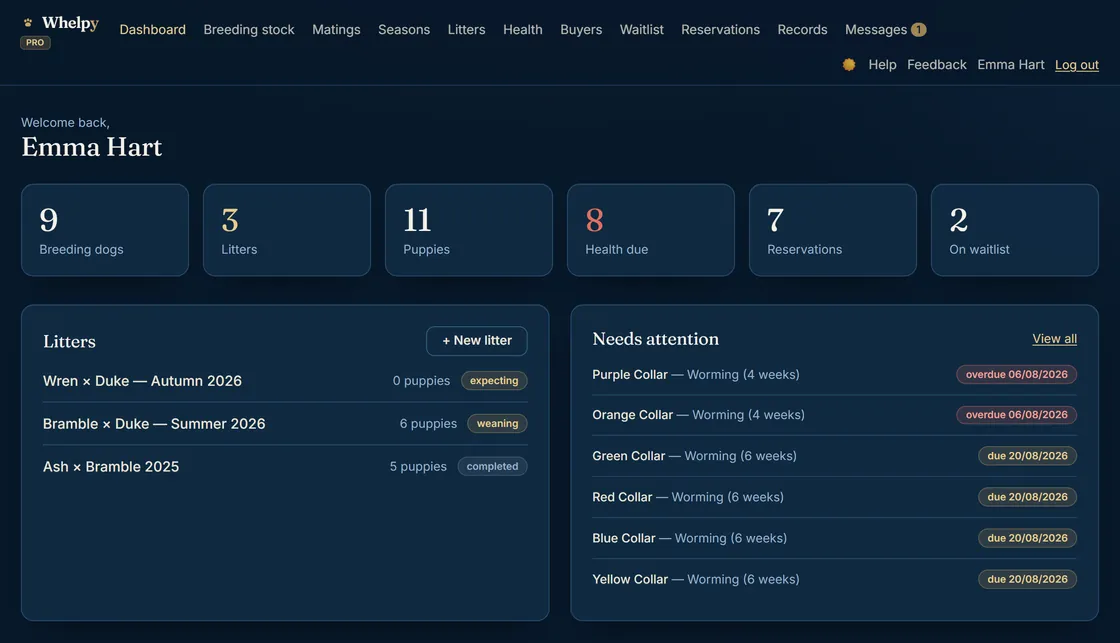
This is what you land on when you log in: how many dogs, litters and puppies you have, what health jobs are due, and who has reserved what.
The list that earns its keep is Needs attention — overdue in red, due today in gold, each one a tap away from the puppy it belongs to. It is the difference between remembering the six-week worming and remembering it on the day.
Everything on this screen is free. The waiting-list tile is the one exception — the waiting list itself is part of Whelpy Pro.
From the mating to the due date
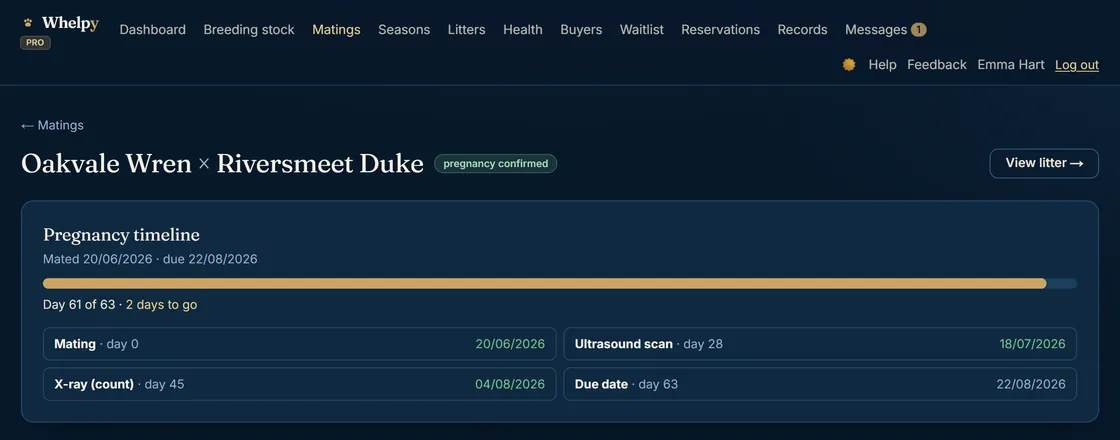
Record the mating and Whelpy does the counting. The scan, the x-ray and the due date sit on one line, with a bar that tells you where you are today — this bitch is on day 61 of 63.
No counting squares on the kitchen calendar, and no wondering whether you booked the scan for the right week.
The 3am whelping record
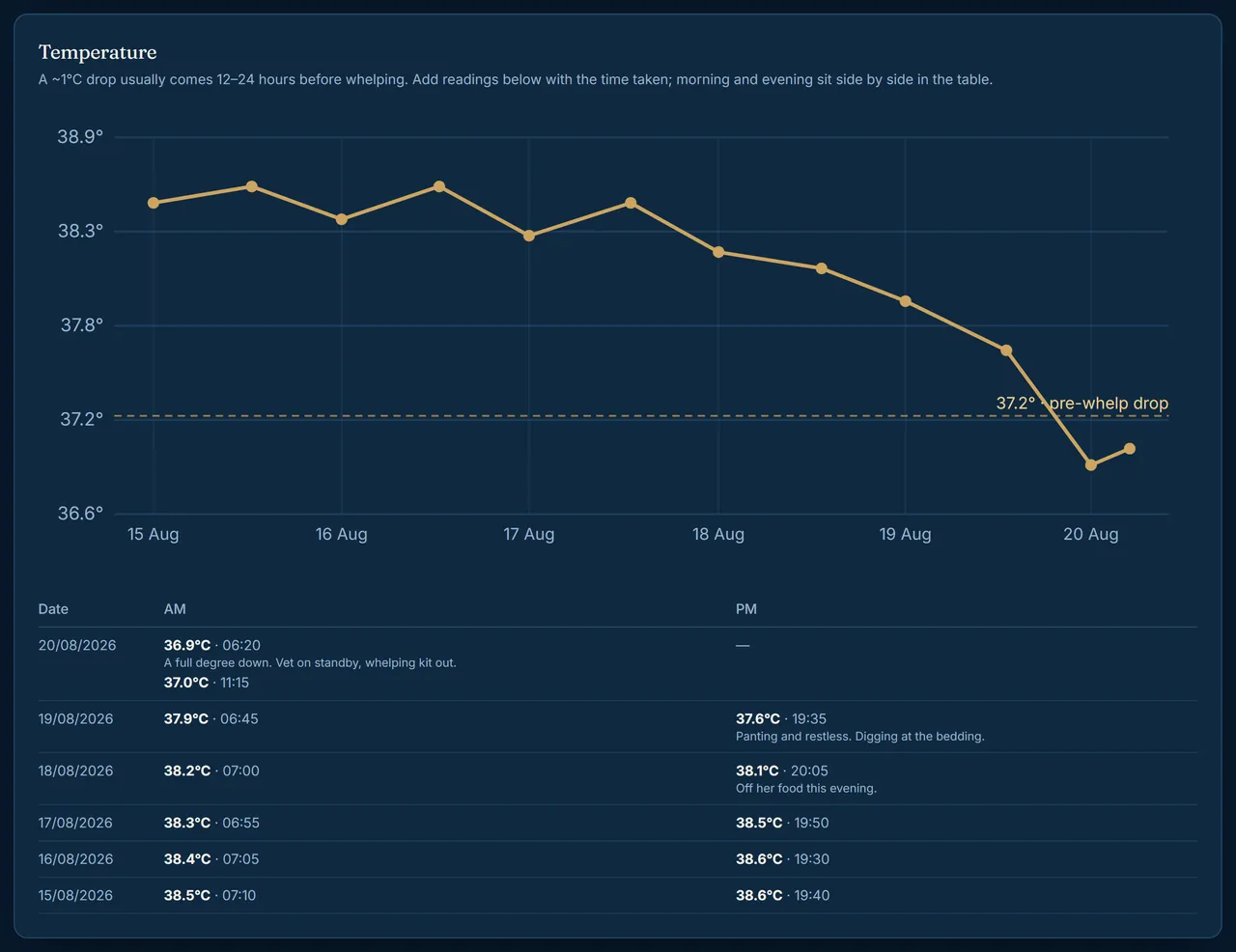
Take her temperature morning and evening in the last week and Whelpy draws the drop — the one that means twelve to twenty-four hours. The dotted line is the guide; your notes sit beside each reading, so “off her food this evening” is still there at 3am when it matters.
Then, on the night: phone in one hand, puppy in the other. Contractions, time of birth, placenta and birth weight, one puppy at a time. It lands straight in your whelping records — there is nothing to write up afterwards, which is the whole point of doing it on the phone.
Every puppy in the litter
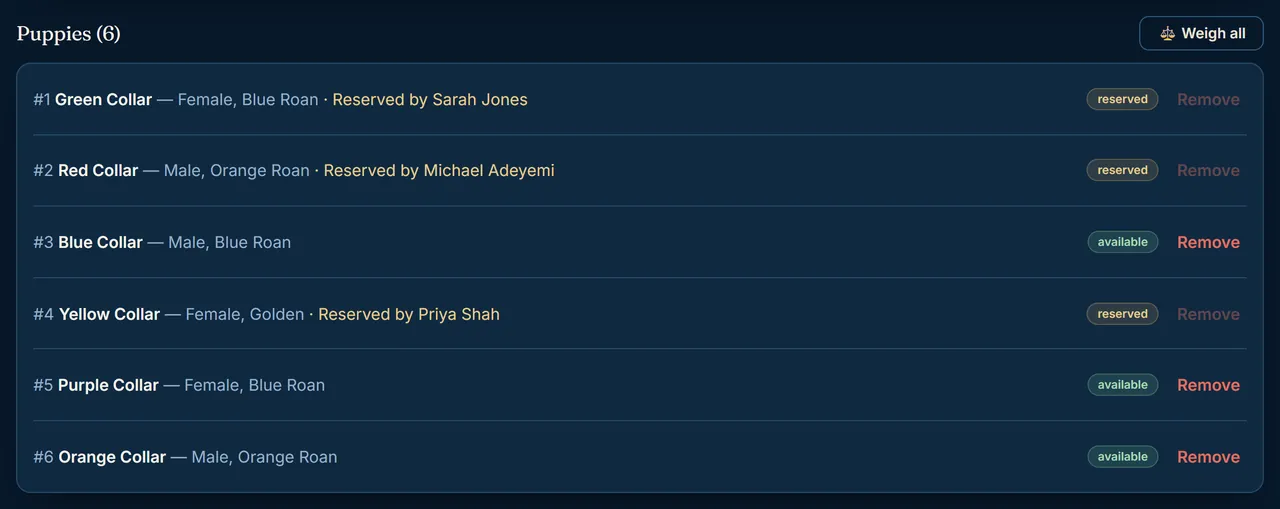
Collar, sex, colour, who has reserved which one and who is still available — the answer to the question you get asked six times a day.
Weigh all does the whole litter in one screen rather than six, which is what you want at 7am with the scales on the floor.
Weights, without the notebook
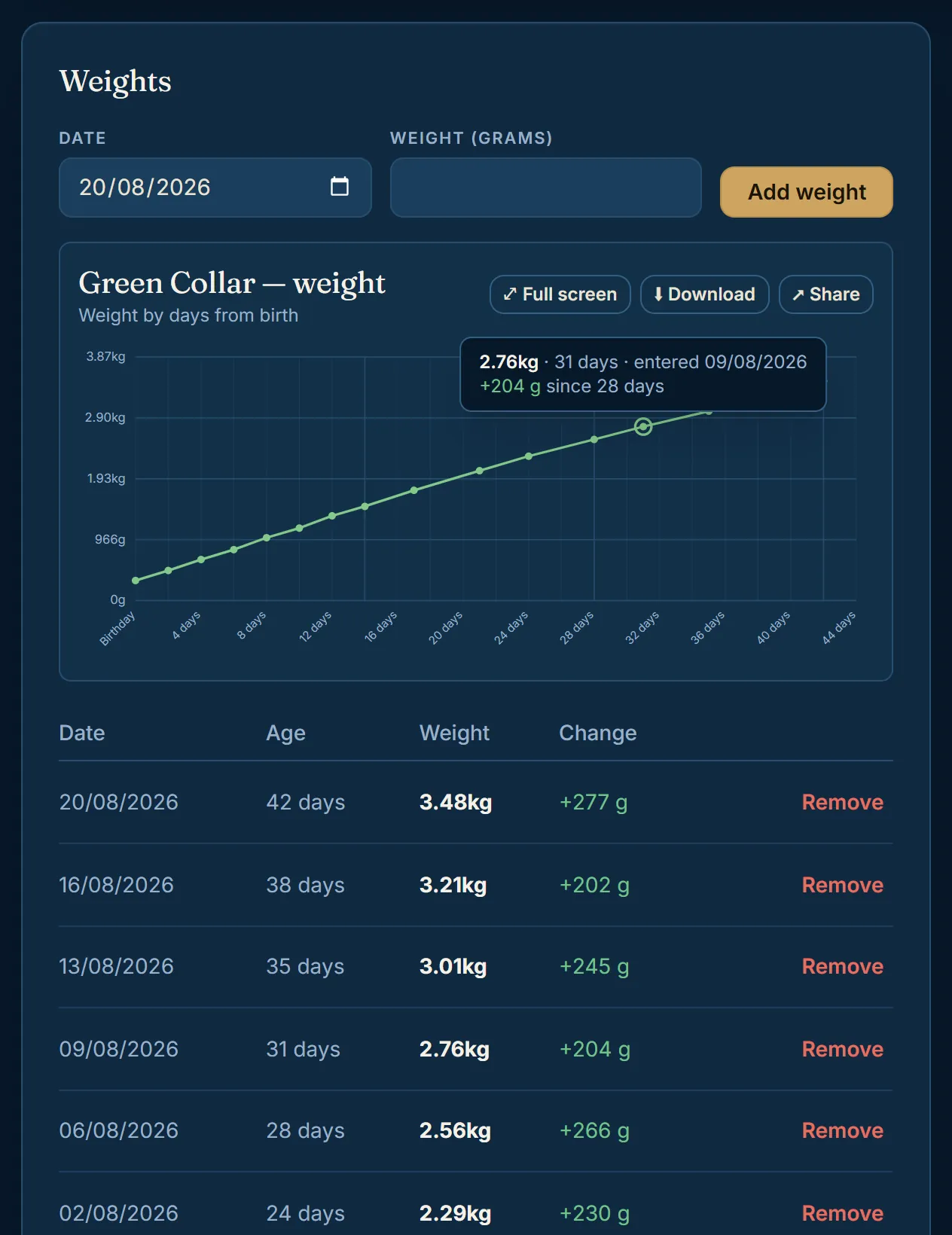
Type the grams in; Whelpy works out the gain since last time and plots it against the puppy’s age. Green Collar here went from 318 g to 3.48 kg in six weeks, across sixteen weigh-ins.
A puppy that is not gaining shows up as a flattening line the same day, not the week after — and if you do need the vet, you can hand over the whole history instead of trying to remember it.
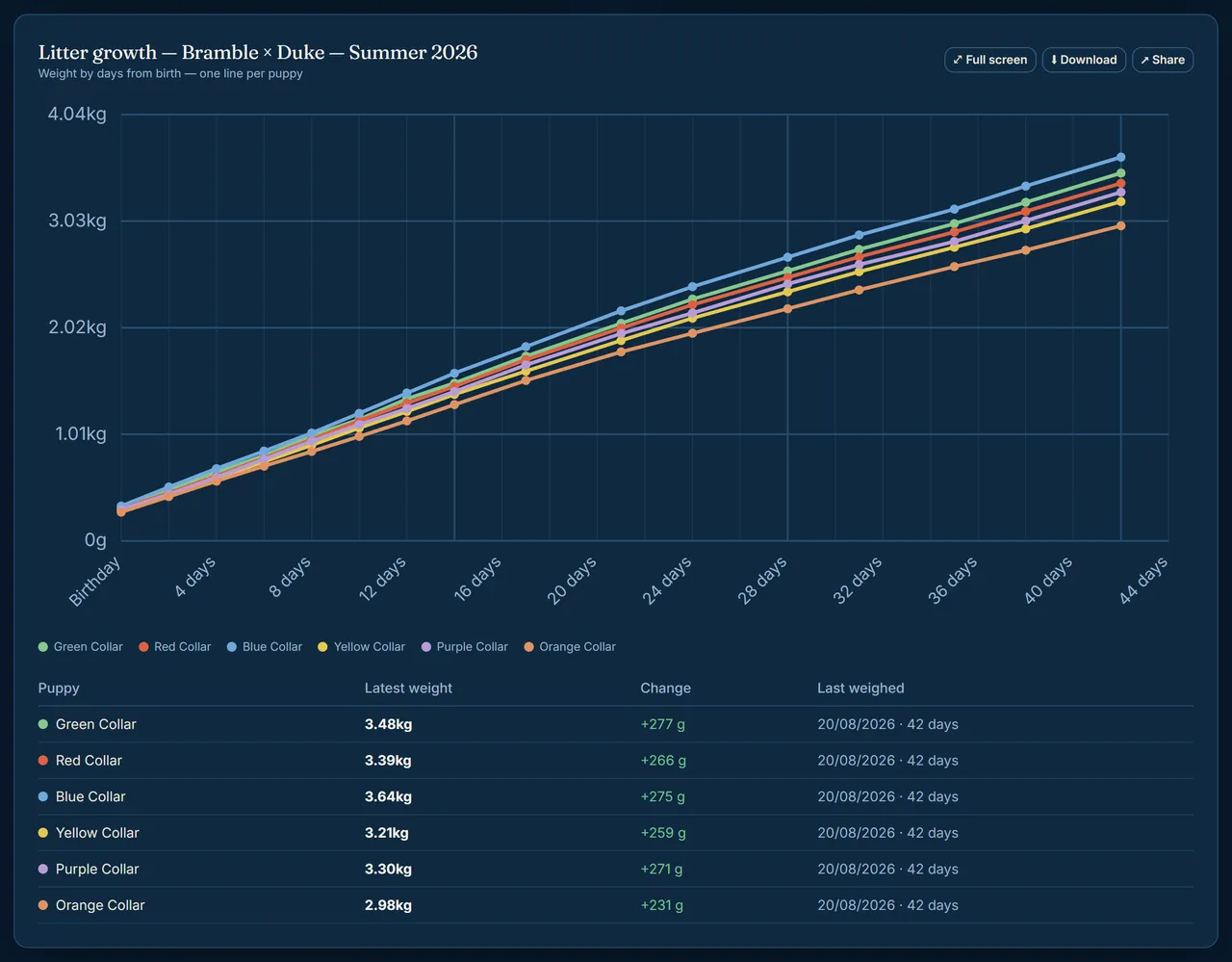
The whole litter on one chart
One line per collar, birth to going home. The line drifting along the bottom is the puppy that needs the warm spot and the extra feed — and you can see it without laying six charts side by side.
Full screen for a proper look, download it, or share it with your vet or a buyer.
Worming and jabs, worked out for you
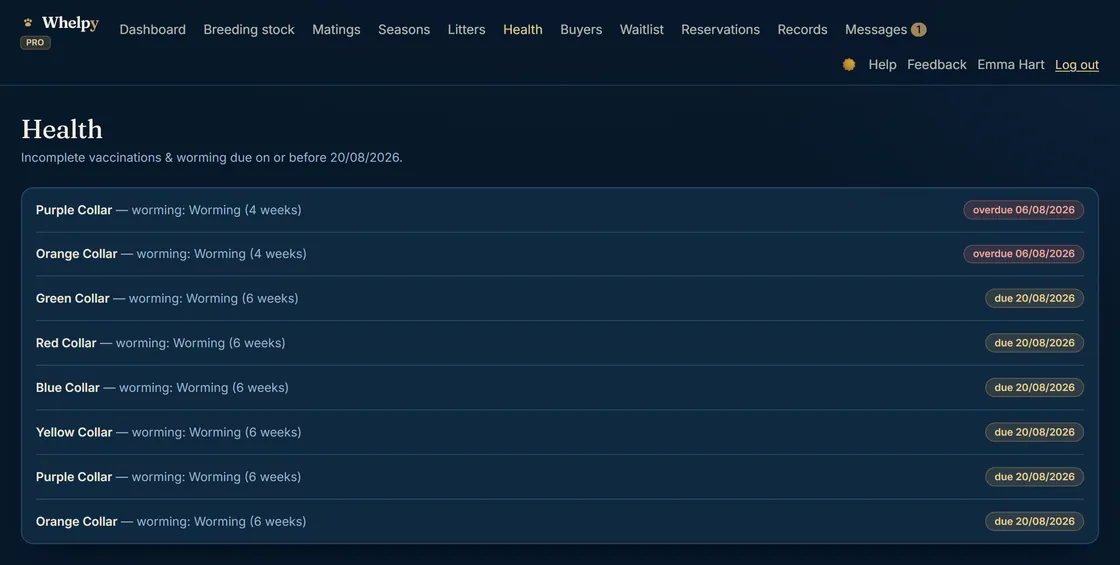
Whelpy builds the worming and vaccination schedule from each puppy’s date of birth, so the dates are there before you think to ask for them.
Overdue in red, due today in gold, and every line opens the puppy so you can tick it off with wet hands. It is also the list that feeds the “needs attention” box on your dashboard.
What your buyers actually see
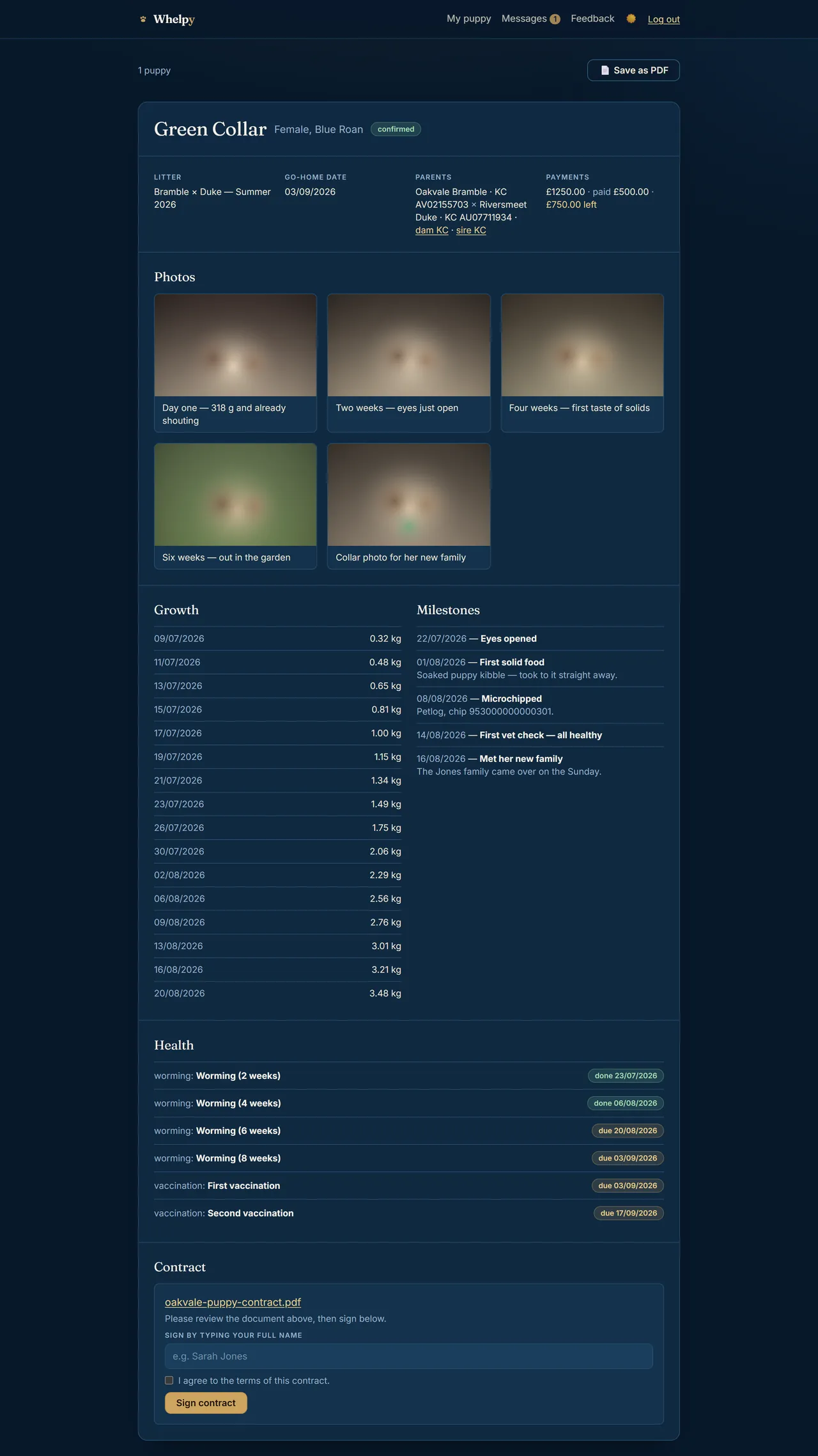
Each buyer gets their own private page — not a group chat, and not your accounts. Their puppy’s photos, every weigh-in, the milestones, the worming and vaccination record, the go-home date, what they have paid and what is left, and the contract to sign online.
It is the part that quietly cuts the “how is she doing?” messages down, because the answer is already on their phone before they think to ask.
The photographs in this demo are stand-in images rather than real puppies — see the note at the top of the page. Everything else on the screen is drawn from the demo records.
Deposits, and what is still owed
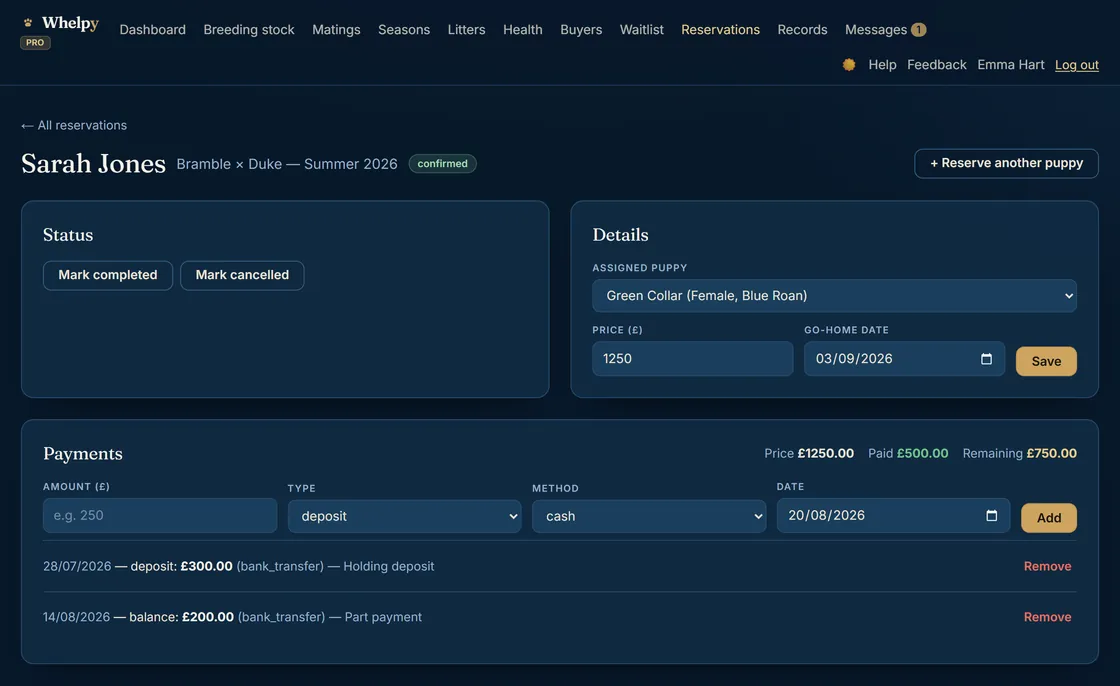
A reservation holds the buyer, the puppy they have chosen, the price and the go-home date. The payments box underneath keeps the arithmetic honest: £1,250 asked, £500 paid across a holding deposit and a part payment, £750 left.
Reservations and go-home dates are free. Recording deposits, balances and refunds against a reservation — and having them flow into your accounts — is part of Whelpy Pro.
A record book that answers the knock on the door
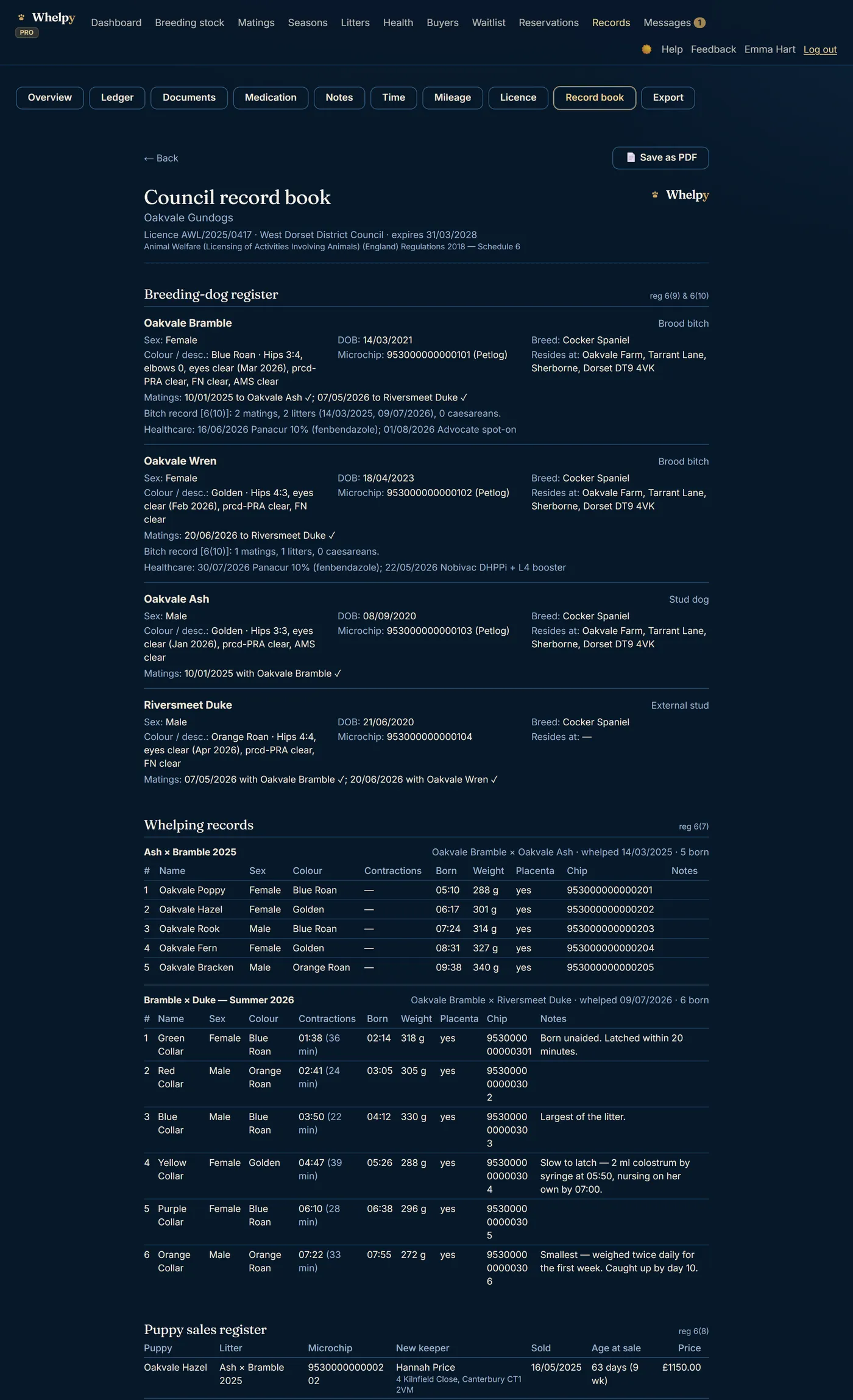
If you are licensed in England, Schedule 6 says what you have to keep: a breeding-dog register, whelping records, a puppy sales register, a healthcare log. Whelpy builds all of them out of what you have already typed in day to day — the temperatures, the birth times, the chips, the sales.
Your licence number and council go on the cover, the regulation references go next to each register, and the whole thing prints or saves as one document. When an inspector asks, you hand over a record book rather than a carrier bag of paper.
The council record book is part of Whelpy Pro.
The books, kept as you go
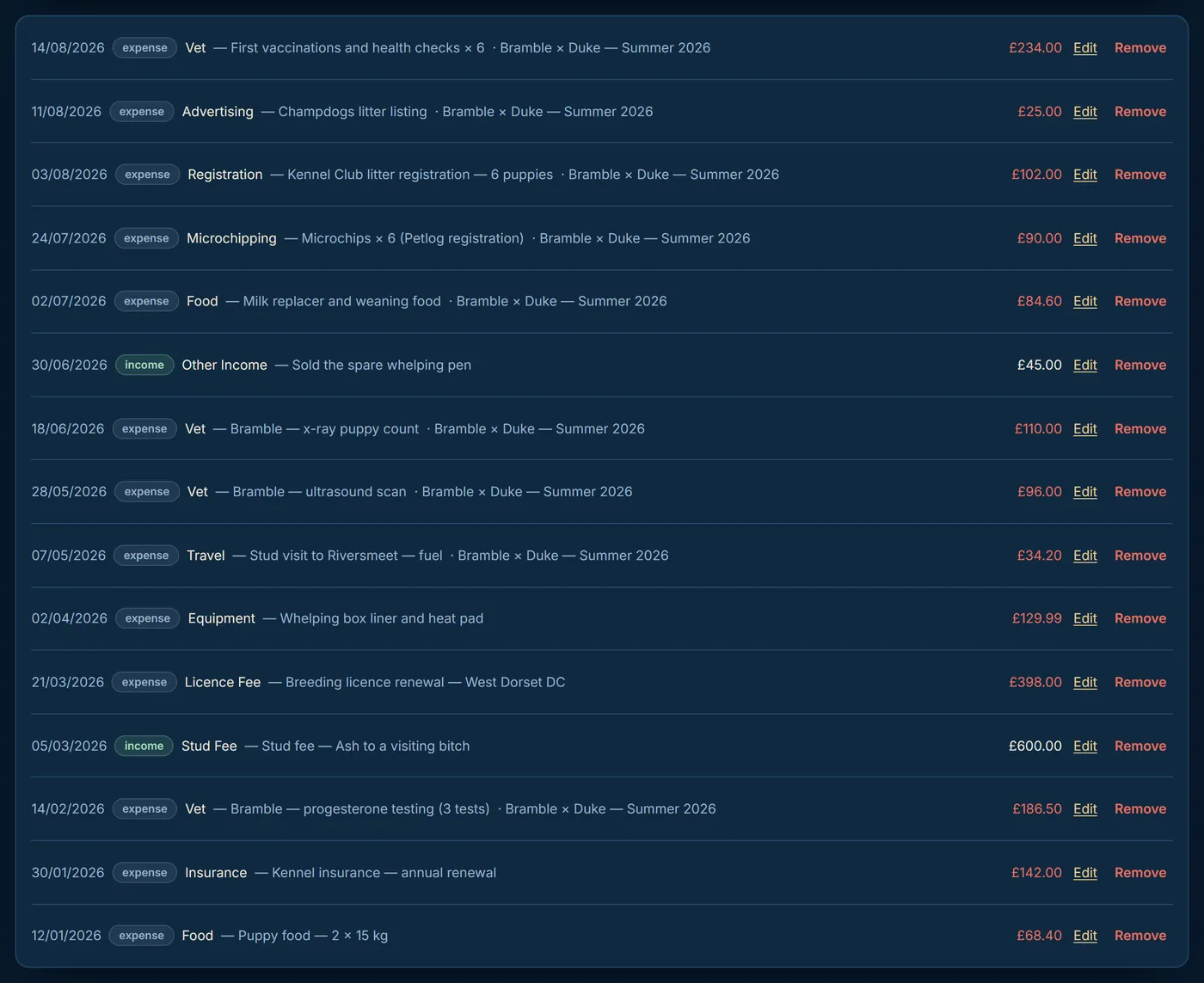
Every vet bill, bag of food, licence renewal, microchip and stud fee, each one tied to the litter it belongs to and dated as it happened.
It takes ten seconds standing at the counter and saves the evening in April where you tip out the shoebox. Exports are free on every plan — Excel, or CSVs precoded for Xero and QuickBooks, so your accountant gets something they can actually use.
The ledger is part of Whelpy Pro.
Your tax year and your council, on one screen
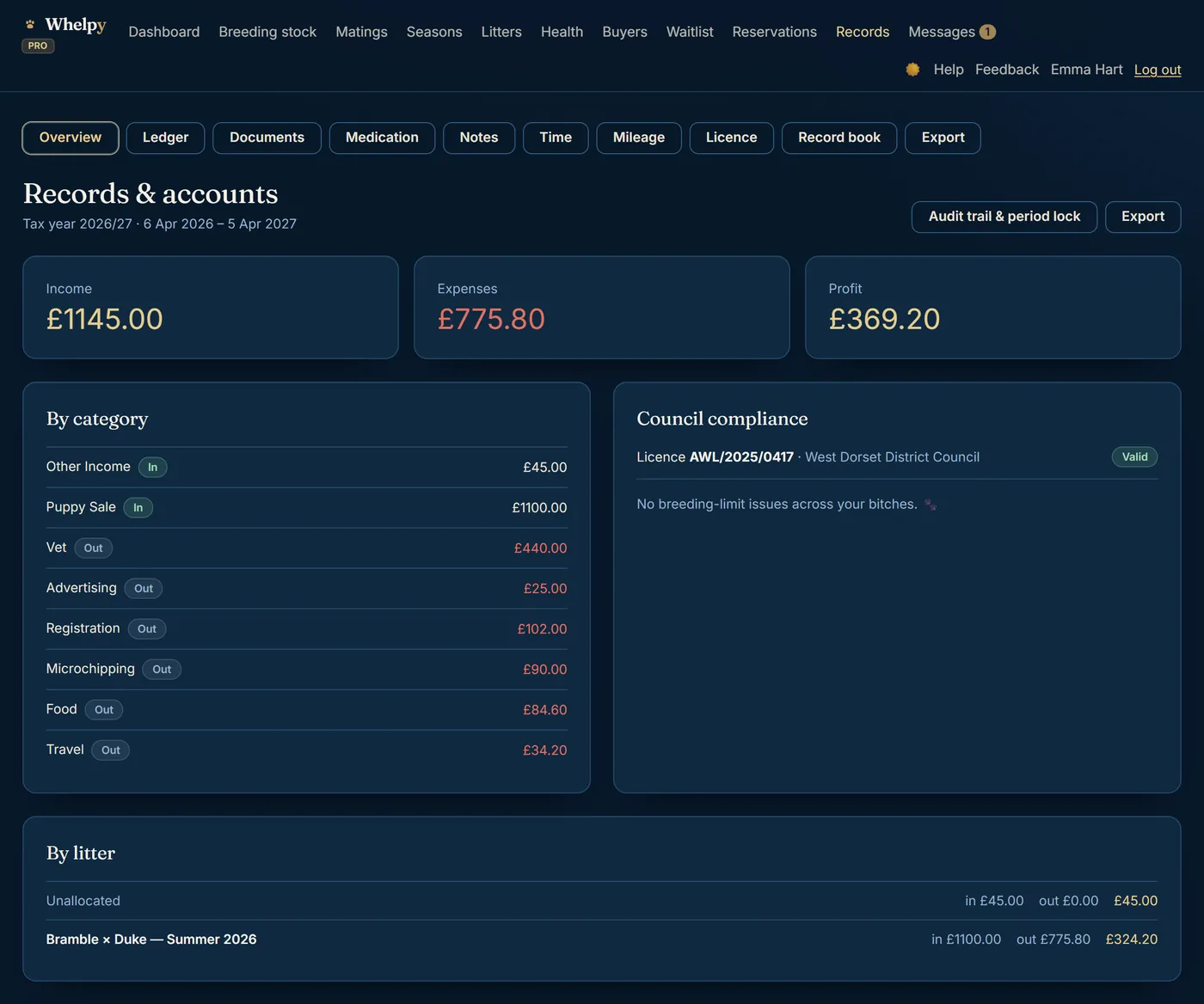
Income, expenses and profit for the tax year (6 April to 5 April, the way HMRC counts it), where the money went, and what each litter actually made once the stud fee, the scans and the food come off the top.
Beside it, the two council questions: is the licence still valid, and is any bitch near her breeding limits. Money and compliance on one screen, which is the screen you want open when somebody asks you a hard question.
Records & accounts are part of Whelpy Pro.
And a few things there was no room for
Seasons and heat cycles, the Kennel Club health-test and pedigree import, printable pedigree certificates, a puppy waiting list, mileage at HMRC’s 45p and 25p rates, a document store for receipts, invoices and vet plans, an audit trail with a period lock, exports to Excel and accountant CSVs, and the whole thing installable on your phone. The pricing page lists every one of them against the plan it comes with.
Start with your next litter.
Whelpy Lite is free forever — not a trial, no card, nothing to cancel. The dashboard, matings, the temperature chart, whelping records, puppy weights, the health schedule and the whole buyer portal are yours for nothing, for as long as you want them.
Whelpy Pro — the council record book, the accounts and the pedigree tools — is £19.99 a month or £199.99 a year, and that is the total you pay. Pro subscriptions open inside Whelpy shortly; start free today and everything you have entered carries straight over when they do.
Bought a puppy from a Whelpy breeder? They’ll send you a private invite link.